


📋 Intent to Apply
Create an Intent to Apply form to collect data before a cycle begins.
Track submission statuses on the Grant Manager dashboard.
👉 Learn more about the Intent to Apply in this tutorial.
📝 Note: This module provides a preliminary stage for applicants before they access the full grant application.
⏳ Interim Report
Build a form to gather data midway through a funding period.
Monitor report statuses through the Grant Manager dashboard.
💵 Can incur additional charges.
👉 Learn more about the Interim Report in this tutorial.
💡 Tip: Use this module as a mid-way check-in to ensure projects remain on track before final reporting.
📄 Page Templates
Save Custom Narrative, Custom Calculation, and Intent to Apply pages as reusable templates for use in any cycle.
Create a library of your best and most-used pages to quickly launch new cycles and edit existing ones.
💵 Can incur additional charges.
👉 Learn more about utilizing page templates in this tutorial.
🏛️ NEA Reporting
Include NEA-specific templates within forms.
Request demographic, location, and budget information required for NEA pass-through funding.
👉 Learn more about the NEA-specific templates and NEA reports in this tutorial.
👥 Registration User Types
Enable registration for individuals, organizations, or both.
Enable grant opportunities to be accessible to specific user types.
📝 Note: This module adds required fields to the registration page based on the selected type.
👉 Get a preview of enhanced profile fields in this tutorial.
🔑 Invitation Only
Create passwords for specific grant opportunities.
Hide opportunities from the public gallery unless a password is provided.
👉 Learn more about password-protecting a cycle in this tutorial.
⚠️ Alert: Ensure passwords are communicated to invited applicants via email before the cycle opens.
🚫 Duplicate Check (One User Per Email)
Activate the Duplicate Check module to prevent multiple account creations.
Restrict registration to one unique account per email address.
🔄 Extended Cycle (Multi-Year Applications)
Build on existing applications for multi-year or multi-phase processes.
Carry over data from previous segments of a cycle.
💵 Can incur additional charges.
👉 Learn more about extended cycles in this tutorial.
🌐 Timezone
Select your region's local time zone to set accurate submission deadlines.
Display consistent times and time zones for applicants on the Grant Applications & Forms dashboard.
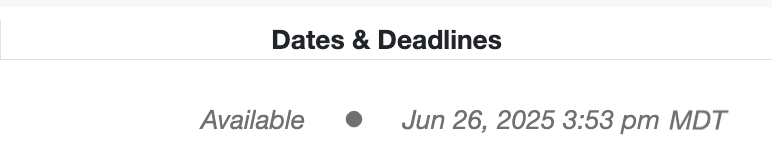
📸 Screenshot showing an example of how the timezone appears for applicants on a cycle.