


🏢 Where do I log in as an administrator?
Administrators who manage the backend of the GO Smart site should always log in at: admin.gosmart.org
👤 Where do my applicants register and log in?
Your applicants log in at your agency's custom domain. This was created when your site was first set up.
The Format:
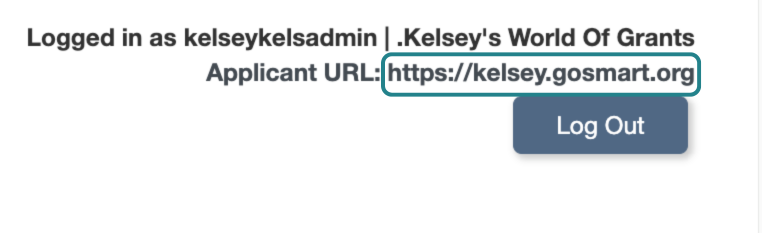
youragencyname.gosmart.orgHow to find it: If you aren't sure of your URL, log in to the admin portal. Your custom applicant domain is listed in the upper-right corner of the dashboard.
Example:
📸 Click here for image alt-text.
Screenshot of a website header showing the logged-in user "kelseykelsadmin" for the organization ".Kelsey's World Of Grants." It includes an Applicant URL displayed as "https://kelsey.gosmart.org" and a "Log Out" button.
🆘 What if an applicant is having trouble logging in?
If an applicant cannot access their account, follow this order of operations:
Forgot Password Tool: Direct them to click the "Forgot Password?" link on the login page of your applicant portal. They must use the exact username and email address they registered with.
Forgot Username Tool: If they forgot their username, they can use the "Forgot Username?" link and enter the email address they have on file for their profile. If they aren't sure what their email is, you can find it for them. Go to the Applicants tab and search for their name. Provide them with the username and email address listed in their record.
Update Email: If they no longer have access to their old email, you can change it for them:
Search for them in the Applicants tab.
Click the Login link next to their name to log into their account.
Go to the Edit Profile, update the email address, and click Save.
Ask them to use the Forgot Password tool with the new email.
Manual Reset (Last Resort): While logged in as the applicant, you can manually enter and confirm a new temporary password for them.
📝 Note: Passwords are encrypted for security. They will always appear as 14 asterisks (**********) even after you save a new one.
🗳️ Where do my panelists log in?
Panelists log in at the same URL as administrators: admin.gosmart.org
Important Panelist Notes:
Credentials: The system does not automatically email panelists when you create their accounts. You must manually send them their username, password, and the login link.
Access Status: Panelists can only log in if their account is set to Active.
Panel Visibility: If a panelist logs in but sees no panels, ensure you have completed all 4 steps of panel creation and that the panel's "Open" and "Close" dates in the Panel Editor allow for viewing.
For an in-depth overview of the 4 steps of panel creation: