


📂 GO Smart Terms Hierarchy
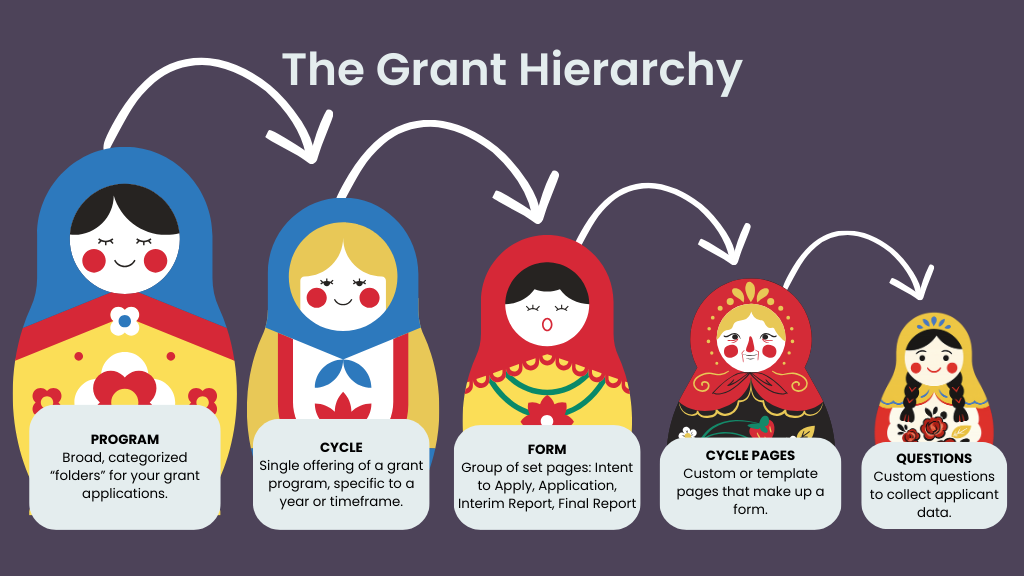
The structure functions like a "Nesting Doll," where each level lives inside the one above it.
📸 Click here for alt-text.
This infographic, titled "The Grant Hierarchy," uses five Russian nesting dolls of decreasing size to illustrate how grant data is organized within the system. Curved arrows point from the largest doll to the smallest, showing that each level is nested inside the one before it. From broadest to most specific, the levels are: 1) Program: The largest doll, described as broad, categorized "folders" for your grant applications. 2) Cycle: A smaller doll representing a single offering of a grant program, specific to a year or timeframe. 3) Form: The next doll down, defined as a group of set pages like Intent to Apply, Application, Interim Report, or Final Report. 4) Cycle Pages: A smaller doll representing the custom or template pages that make up a form. 5) Questions: The smallest doll, representing individual custom questions used to collect applicant data.
🪆 Core Structural Levels
Program: The broadest "folder" or category to house all associated rounds of a specific funding opportunity.
Program Cycle: Use for a single instance or offering of a program, typically defined by a specific year or timeframe.
Form: Group pages together as a single set, such as an "Application" or "Final Report".
Cycle Pages: Build individual, custom, or templated pages within a form, based on the form's purpose. This allows you to break up long applications into digestible sections.
Questions and Settings: Specific data collection points (questions) or upload parameters to collect applicant data. You must add Questions to these pages for applicants to provide data, although some pages, such as Custom Tables or Media Libraries, rely on settings to generate their structure rather than individual narrative questions.
📝 Notes:
A Program acts as an administrative folder and is not visible to applicants.
Forms are color-coded in the admin site:
purple for Intents to Apply,
peach for Applications,
yellow for Interim Reports,
green for Final Reports.
⚖️ "Grant" vs. "Cycle" vs. "Program"
Choosing the correct term depends on your audience and the specific task you are performing within the system.
🎯 How to Select the Right Term
Use "Grant" when describing the funding opportunity to an external audience or in marketing materials.
Use "Cycle" when managing the specific administrative round, building forms, or cloning a previous year's work.
Use "Program" when organizing your administrative folders or naming the high-level category in GO Smart.
💡 Tips:
Am I talking about what applicants see? → Use Grant.
Am I talking about the specific round I’m building? → Use Cycle.
Am I talking about the folder holding all rounds? → Use Program.
⚙️ Advanced Tools and Features
Enable a more customized, efficient cycle-creation process and a nuanced application experience.
📖 Key Feature Terminology
Clone Tools: Duplicate entire Programs or specific Cycles to save time when creating recurring grants.
👉 Learn more about the clone tools and when to use them in this tutorial.
Conditional Logic: Create "choose-your-own-adventure" forms that show or hide questions based on an applicant's previous answers.
👉 Learn more about conditional logic in this tutorial.
Multiple Submission Tool: Allow an applicant to provide multiple responses for the same data type, such as a list of board members.
👉 Learn more about the Multiple Submission tool in this tutorial.
Templates: Create and save your own custom templates to easily insert into any cycle or application.
👉 Learn more about the templates tool in this tutorial.