

Start Here: Choose Your Cycle’s Display Setting
Determine whether each active application cycle should appear in the Creative West Opportunities Portal.
Choose Yes if you want to:
Make your opportunity discoverable in the centralized Opportunities Portal.
Help applicants find your listing while exploring grants, residencies, and other creative opportunities.
Direct interested applicants from the portal to your GO Smart application.
Choose No if you want to:
Keep the cycle available only through your GO Smart applicant portal.
Exclude the cycle from the Creative West Opportunities Portal.
Hidden and password-protected cycles do not appear in the Opportunities Portal.
🎛️ Include or Exclude a Cycle
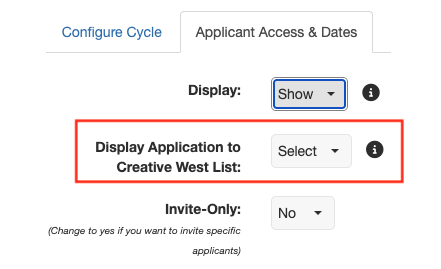
📸 Screenshot of the "Display Application to Creative West List" dropdown.
Go to the Grant Editor tab → Program Cycles → Application Access & Dates.
Select your program and cycle.
Find the field labeled Display Application to Creative West List.
Note: If this field is missing, temporarily change Display to Show and Invite-Only to No, if applicable, to reveal it.
In the Display Application to Creative West List dropdown:
Select Yes to include the cycle in the Creative West Opportunities Portal.
Select No to exclude the cycle and display it only on your GO Smart Portal.
If you adjusted settings in Step 3, change Display back to Hide and/or Invite-Only back to Yes. Your Display Application selection will be hidden but will still apply.
Click Save Changes.
💡 Tip: Save this setting for each live cycle. You may temporarily see a reminder pop-up in GO Smart prompting you to review this setting. Saving your preferred setting dismisses the reminder for that cycle. If you have already saved a preferred setting for all live applications, you can disregard the pop-up.
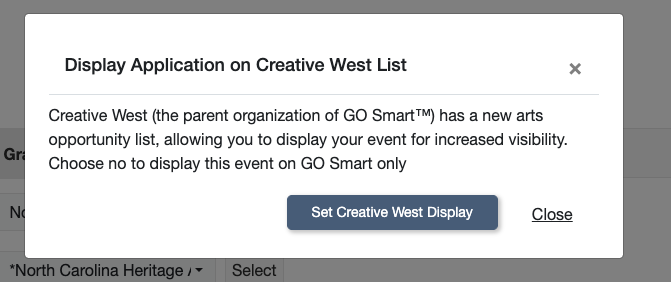
📸 Screenshot of the pop-up to manage display visibility cycle on Creative West Opportunity List. Options: blue button "Set Creative West Display" and "Close" link.
🧐 If You Selected Yes: Preview Your Listing
After saving Yes, wait approximately 60 seconds for the listing to appear in the Creative West Opportunities Portal. The portal displays information from your GO Smart cycle, including its name, description, message, and application dates.
🌐 Creative West Opportunities Portal Preview Steps:
Open the Creative West Opportunities Portal
Enter a keyword from your cycle name in the search.
Preview the listing in the right-hand sidebar.
Click the fullscreen icon to open and preview the complete listing.
Click Apply at GO Smart to see how the applicant will be directed back to your portal.
If your listing clearly communicates the opportunity and gives prospective applicants the information they need to decide whether to learn more, no further action is necessary.
💥 Improve Your Listing: Optional Optimization Steps
The steps below can help make your opportunity easier for applicants to find, understand, and act on. Any updates you make in GO Smart will also appear in your existing GO Smart applicant portal, so preview changes in both spaces to ensure the experience is clear and consistent for direct applicants.
👉 Click here for steps to Preview Your Listing in GO Smart.
🕵️ Audit Your Agency Name
Ensure your Agency Name in GO Smart is listed exactly as you want it to appear in the Creative West Opportunities Portal Directory. Your agency name is usually the first indicator of where your funding is offered as well as the type of funding or awards you offer.
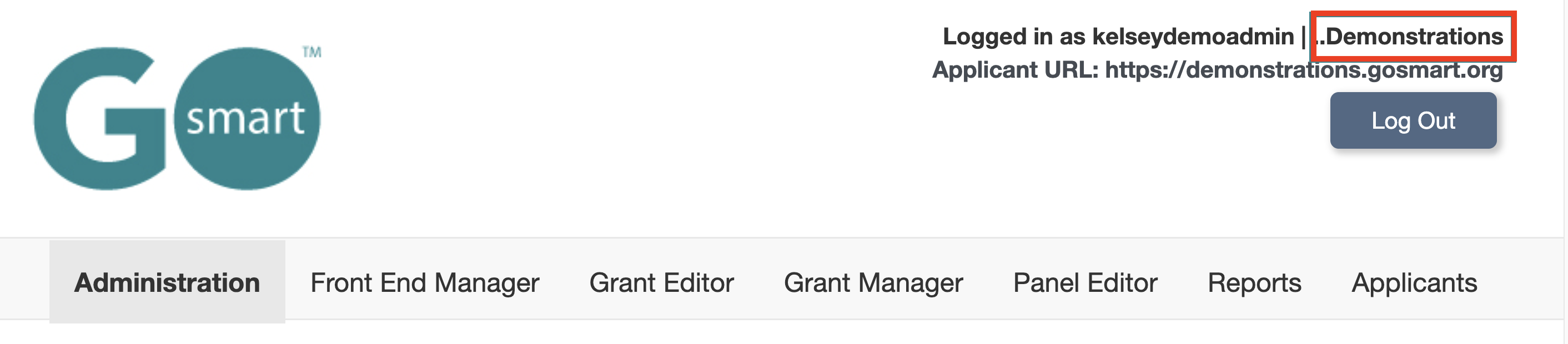
📸 Screenshot of the admin.gosmart.org logged in header displaying the logged in username, agency name in red rectangle, and applicant URL.
🔍 Check Your Agency Name:
Log in to admin.gosmart.org.
Note the name of your agency in the top right corner: “Logged in as [username] | [Agency Name]
Contact the GO Smart team to change your agency name, if necessary.
✍️ Rename Cycles for Clarity
Use descriptive, public-facing cycle names. Avoid internal jargon or codes so listings are intuitive for both Opportunities Portal users and returning applicants.
Example: Use "Community Arts Impact Grant 2026" instead of "FY26-CAI"
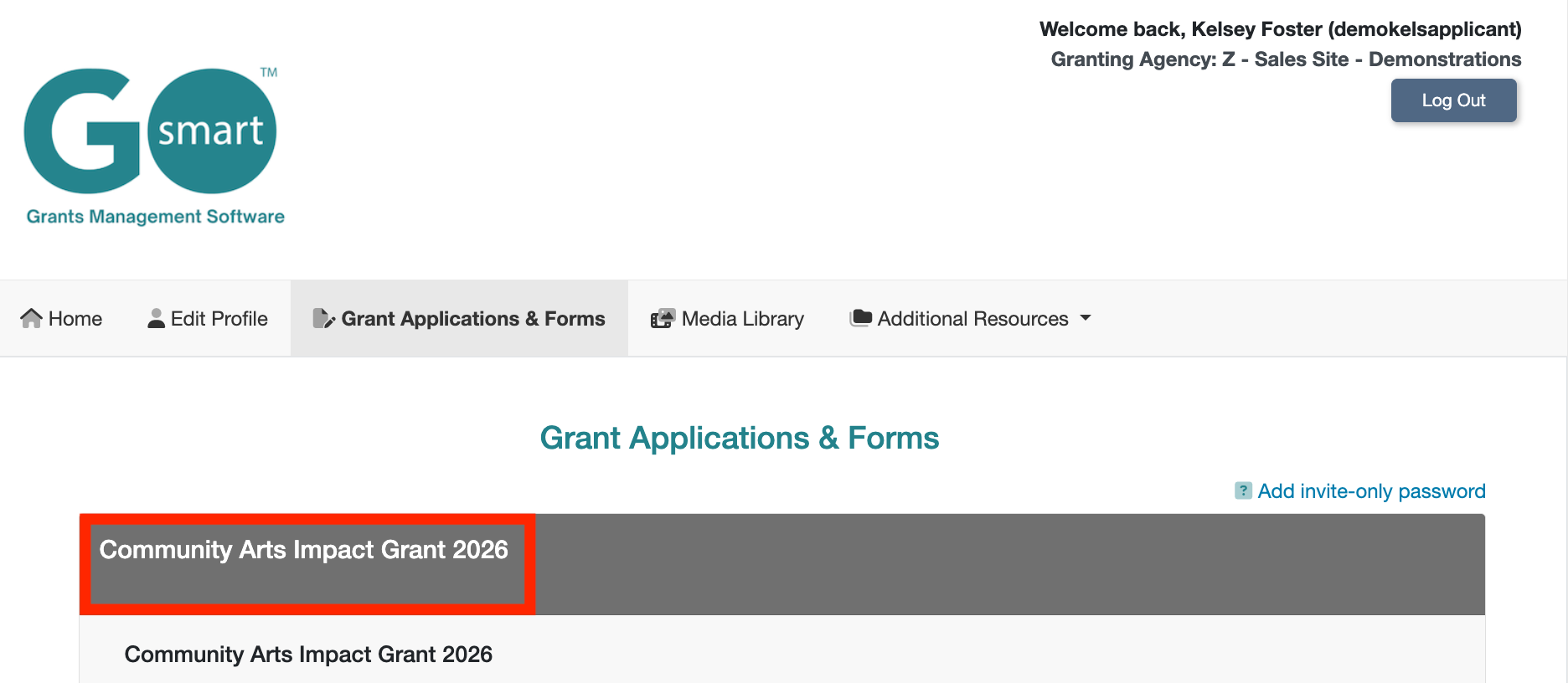
📸 Screenshot of the applicant’s portal and Grant Application & Forms tab with the cycle name for the top opportunity displayed in a red rectangle.
⚙️ Update Your Cycle Name:
Go to the Grant Editor tab → Program Cycles subtab
Select the program and cycle
Click the Configure Cycle tab
Update the Cycle Name
Click Save Changes
📋 Optimize Program Description and Program Message Fields
Your existing Program Description and Program Message fields are the primary way visitors learn about your grant. Use the Program Description field to establish your identity. State your agency name and the primary goal of your grant so applicants can immediately identify the source and purpose of the funding. Use the Program Message field to highlight Key Eligibility Guidelines, Geographic Parameters, and Award Amount(s).
💡Tip: Use dashes, bolding, or ALL CAPS headers (e.g., ELIGIBILITY, LOCATION) to make key details easy to scan.
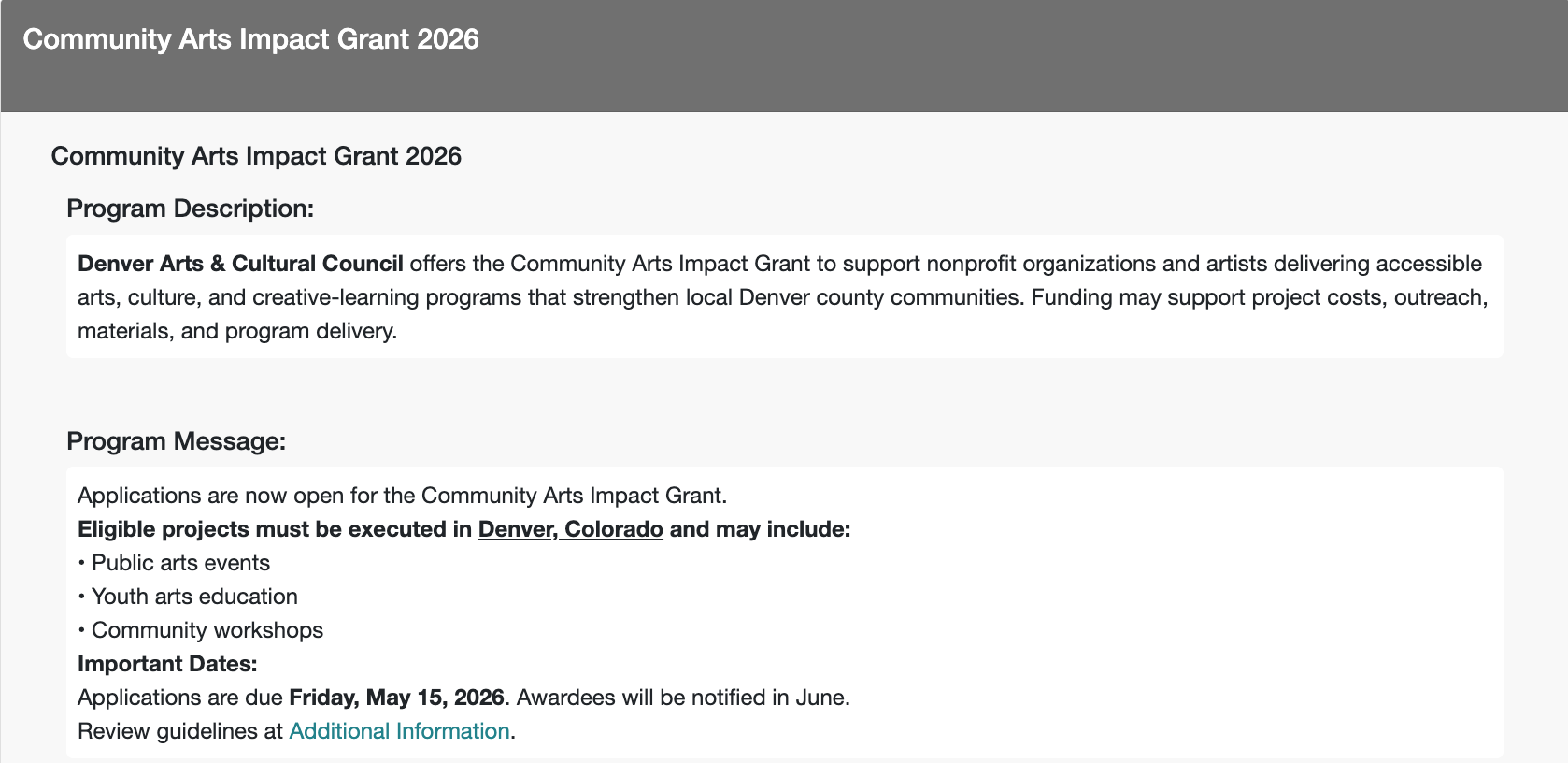
📸 Screenshot of the applicant’s portal and Grant Application & Forms tab with the program description and program message displayed.
🛠️ Update Description and Message Fields:
Go to the Grant Editor tab → Program Cycles subtab → Additional Text section
Select the program and cycle
Update the Program Description and Program Message text
Click Save Changes
📅 Verify Cycle Dates
Confirm that your Application Open and Final Submission deadlines are accurate. The Creative West Opportunities Portal uses these dates to trigger automatic "Deadline Approaching" alerts to interested applicants.
⏱️ Date Verification Process:
Go to the Grant Editor tab → Program Cycles subtab → Applicant Access & Dates section
Select the program and cycle
Verify Open and Deadline dates and times are accurate
If changes were made, click Save Changes
⚙️ Close Completed Cycles
When your cycles are complete and applicants no longer need to access any forms, close your cycle so that it no longer appears on your GO Smart applicant dashboard nor the Creative West Opportunity Portal. You will still be able to manage the dashboard, administer panels, and pull reports for closed cycles.
🛠️ Closing Cycles:
Go to the Grant Editor tab → Program Cycles subtab → Applicant Access & Dates section
Select the program and cycle
Set Display: Hide
Click Save Changes
Need to Change Your Decision Later?
You can return to Display Application to Creative West List at any time to update a cycle’s setting.
Select Yes to include the cycle in the Opportunities Portal.
Select No to remove the cycle from the Opportunities Portal while keeping it available through your GO Smart applicant portal, such as when an application has moved into the post-award phase.
Click Save Changes after updating the setting.
